
A crucial component of financial governance has emerged as companies move more and more towards digital platforms for invoicing: thorough reporting and documentation of canceled invoices. This blog offers a thorough manual for companies managing the difficulties of E-invoice cancellation reconciliation to the regulatory environment governing reporting requirements.
What is E-invoice?
The exchange of an electronic invoice document between a buyer and a supplier is known as electronic invoicing. An automated import of machine-readable data from the supplier into the buyer’s Account Payable (AP) system eliminates the need for manual data entry when an electronic invoice is structured.What is E-invoice Cancellation?
E-invoice cancellation is rescinding or nullifying a previously sent electronic invoice. E-invoices are electronic copies of conventional paper invoices usually used in commercial transactions for invoicing and payment. The cancellation procedure is intended to correct errors or alter data related to an invoice. It’s crucial to remember that the process for canceling an electronic invoice and its specifics could change based on the platform, electronic invoicing system such as CaptainBiz, and national laws.How to Reconcile Canceled E-invoices and meet GST Reporting and Documentation Requirements?
Canceled E-invoices Documentation Requirements
Depending on the jurisdiction and local tax laws, there may be differences in the E-invoice reporting documents needed for canceled electronic invoices. Remember that to ensure you conform with local laws, you must speak with a tax expert or legal counsel in your area. The following are some standards for general documentation:- Cancellation Request: Include a formal request to cancel the electronic invoice in your request. The cause for the cancellation, the invoice number, the date of issuance, and any other pertinent information should all be included in this request.
- Original Invoice: Give specifics about the actual electronic invoice being canceled. This contains the invoice number, the date of issuance, the parties’ names and addresses, and the associated sums.
- Correction Document: You can be required by the jurisdiction to provide a corrected invoice or credit note as a correction document. The updated information should be included in this document, along with a reference to the canceled invoice.
- Tax Authorities Notification: Depending on the jurisdiction, you might have to notify the tax authorities when an e-invoice is canceled. This could entail sending off particular documents or alerts.
- Recordkeeping: Ensure all paperwork about the canceled e-invoice is kept in order. This covers all copies—digital and physical—and any accompanying paperwork.
- Internal Controls: Put internal controls in place to stop unauthorized cancellations and ensure the cancellation method complies with your company’s rules and guidelines.
- Inaccurate entry
- Duplicate entry
- Order cancellation by the buyer
Canceling e-invoice
- Click “Cancel” from the “E-Invoice” menu after accessing the e-invoice dashboard on the e-invoice portal.
- Click the “Go” button after entering the IRN or acknowledgment number in the designated field.
- To be canceled, the electronic invoice is shown by the system. Decide on the cause of the cancellation.
- Incorporate the remarks as well, then press the “Submit” button.
- Upon cancellation, the system will show a confirmation message and the e-invoice with the watermark “canceled.”
Modification in GST Portal
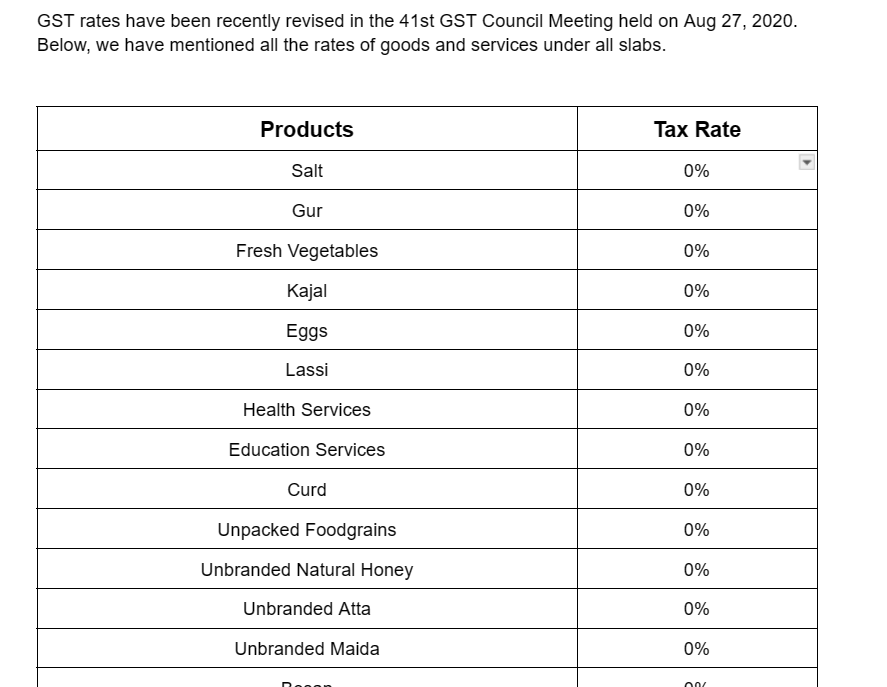
The GST site allows users to edit and cancel e-invoices by the law’s provisions. However, IRP cancellations are only accepted up to 24 hours in advance. This implies that changes and cancellations of electronic invoices would persist during Form GSTR-1 reporting. Some of the recently revised GST Rates are as follows:
Write about the Step-by-Step Process to Cancel an e-invoice.
The following actions should be followed to cancel or amend the e-invoice, regardless of the reason—such as the buyer’s incorrect or duplicate entry or cancellation.- The e-invoice dashboard on the e-invoice portal must be seen first and foremost.
- The second step is to locate the “Cancel” option under “E-Invoice.” You must select “Cancel.”
- The acknowledgment number or the IRN must now be entered into the box. After that, select “Go” by tapping on it.
- There, you must select one of the explanations for the invoice cancellation. After entering your comments, press the “Submit” button.
What are the Best Practices for maintaining Accurate and up-to-date E-invoice Cancellation Records?
Keeping accurate and current records of e-invoice cancellations is essential for compliance and efficient financial management. The following best practices will help you make sure that your records of e-invoice cancellations are current and accurate:- The taxpayers ought to account for the 24-hour cancellation window.
- The government portal will not permit the cancellation after 24 hours.
- If the cancellation period has passed, taxpayers must modify the GSTR-1.
- GSTR-1 is automatically updated with the canceled status if the IRN is canceled.
- Furthermore, taxpayers must constantly abide by the laws and guidelines about GST.
- Taxpayers cannot cancel partial E-invoices. In the event of an error, they can only cancel it in bulk or as a single item.
- If the IRN is withdrawn, the same E-invoice number cannot be used again. The E-invoice will be refused if it is used.
- Companies must closely monitor all modifications made to the E-invoice cancellation procedure.
- Once the 24-hour period has passed, you can cancel the E-invoice by issuing a debit or credit note.
- Automated software should be used to prepare E-invoices to prevent errors and cancellations.
Conclusion
Reconciliation is a vital checkpoint for preserving financial integrity, allowing businesses to detect, look into, and address inconsistencies quickly. In addition to making it easier to comply with regulations, thorough documentation creates a rigorous audit trail that can be very helpful in the event of a disagreement or inquiry. Also Read: Amendments and Updates to E-invoice Cancellation ProvisionsFAQs
-
Can IRN/e-invoice be deleted or modified?
-
Can I partially cancel the e-invoice?
-
Can I use the same e-invoice more than once?
-
How can an e-invoice receiver know whether it has been canceled?
-
What should I do if the electronic invoice has an error or improper data entry?
-
When I make a new invoice after canceling, can I use the same e-invoice number?
-
Can I cancel an e-invoice after 24 hours?
-
Is it possible to use the same IRN to create an electronic invoice?
-
Can I cancel an electronic invoice?
-
Can someone remove their electronic bills?