
GSTR 2B is auto-drafted taxpayer data. It offers ineligible and eligible ITC (Input Tax Credit) every month, the same as GSTR 2A. Still, the difference between the two is that they remain unchanged or consistent for a period. The basics of GSTR 2B are when GST portal GSTR 2B is accessed for a month, the given data remains unchanged for the supplier’s subsequent changes in the next month. For those who fall under the GST slab, it is important to have a proper introduction to GSTR-2B.
GSTR 2B is accessible to all casual, regular, and SEZ taxpayers. Based on GTR1, GSTR 5, and GSTR 6, all recipients can generate GSTR 2B. The given statement will show the details according to the document series of Input Tax Credit eligibility. The information in ITC will be filed from the recorded date of the M-1 (preceding month) for GSTR 1 up to the given filing date for the M (current month) of GSTR 1.
Also Read: Key Differences Between GSTR-2A And GSTR-2B
GSTR 2 Definition
While explaining GSTR-2B, it is an ITC statement; it is auto-drafted and can be generated by average taxpayers on the data given by the supplies according to GSTR 1/IFF, GSTR 5, and GSTR 6. The data indicates to the taxpayers the non-availability and availability of ITC according to the documents the suppliers file.Understanding the Purpose of GSTR 2B
The information in the statement is reported in such a way that allows the taxpayers to reconcile input tax credits with their records and accounts. This will help them identify the documents to confirm the following points while understanding GSTR-2B:- ITC is only assisted once against a single document.
- In GSTR 3B, the GST law, the ITC is reversed whenever required.
- GST is paid based on the reversed charge for the applicable documents, which include the import of services.
What are the Benefits of GSTR-2B?
Taxpayers can reconcile ITC using their accounting records, thanks to how the data in GSTR-2B is reported. They will find it easy to identify the following papers with their assistance:- A single document cannot be used to claim an input tax credit more than once.
- When necessary, the tax credit is reversed by the GST rules in their GSTR-3B.
- GST is paid for the relevant papers, including the import of services, using a reverse charge basis.
- The statement lists the appropriate GSTR-3B tables or columns that must be accessed to claim an invoice’s or debit note’s input tax credit.
What are the Two Categories of GSTR-2B?
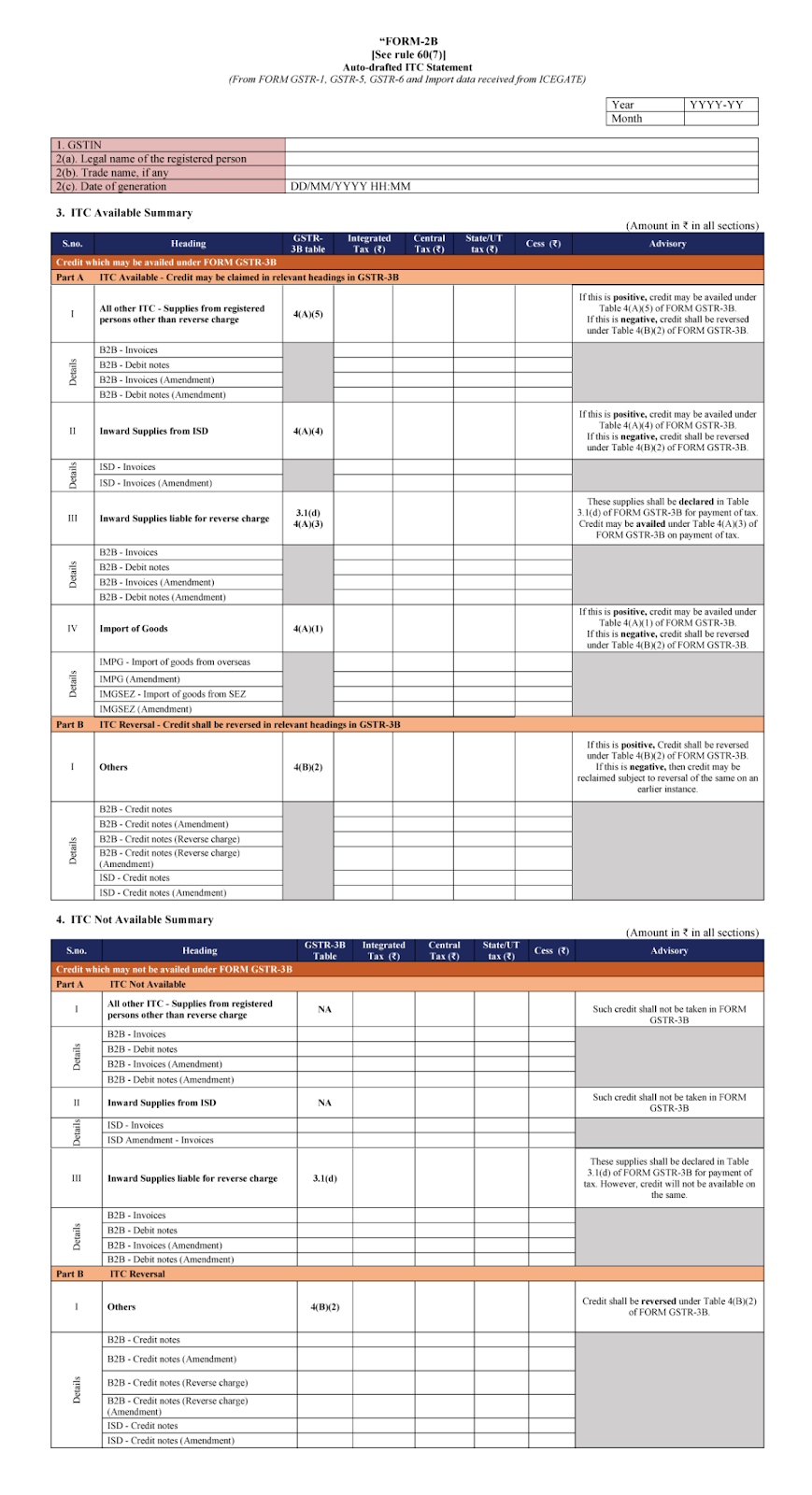
The GSTR-2B are divided into two different categories. It is crucial to understand information in GSTR-2B. These are-- Availability of ITC– PART-A of ITC Available is divided into four sections: ITC for supplies from registered individuals, ITC from ISD, ITC for inward supplies on reverse charge, and import of products. It includes information on inward supplies, including amendments, credit-debit notes (CDN), and import of goods. On the other hand, the “Others” section of PART-B, which deals with ITC Reversal, includes information on credit notes and changes.
- Not availability of ITC: Three sections comprise PART-A of ITC Not Available- All other ITC for supplies from registered individuals, ITC from ISD, and ITC towards inbound supplies on reverse charge. Part A also includes purchase invoice or CDN data, including any changes. In contrast, PART-B’s “Others” heading contains CDN data and updates.
What are the Important Features of GSTR 2B?
GSTR 2B provides prominent features to businesses. Those are:- Remains Unchanged
- Maximum Convenience
- Detailed Information
- Import Information
- Input Tax Credit Segregation
- View Advisory
- Details According to the Suppliers
Differences Between GSTR 2A and GSTR 2B
Understanding the difference between GSTR-2A and GSTR 2B is important. It follows-| Points | GSTR 2A | GSTR 2B |
| Nature | GSTR 2A is very flexible and as the suppliers furnish every document it is subjected to change constantly. | GSTR 2B is static. And the time it is generated it remains constant. |
| Input Tax Credit Claim | When a supplier files the statement GSTR 1, the ITC updates the transaction month-wise. Therefore, the taxpayers can avail of the ITC in that particular month when the transaction is performed. | The transaction appears on the month when the suppliers’ files GSTR 1. |
| Date Availability | When the suppliers furnish the document, the real-time data is reflected. | After the 12th of each month, all the pieces of information are available. |
| Input Tax Credit available from Special Economic Zone (SEZ) unit | Details related to the availability of ITC from the Special Economic Zone unit are not available here. | Details related to the availability of ITC from the Special Economic Zone unit are available here. |
| Data Source | The GSTR 2A form complies with/collects the data from form GSTR 1, form GSTR 5, form GSTR 6, form GSTR 7, and form GSTR 8. | On the other hand, form GSTR 2B collects or complies with the data that are filed by the suppliers in form GSTR 1, form GSTR 5, form GSTR 6, and ICES. But does not give the deduction information from TDS and TCS. |
How To View & Download GSTR 2B?
With the following steps, you can view and download the statement from the GST portal.- Step 1: Visit the GST Council’s official website.
- Step 2: Now log in to the GST portal by filling in the username, password, and captcha code blanks.
- Step 3: Click on “services”.
- Step 4: Now click on “returns dashboard”, the option is under the tab “returns”.
- Step 5: Choose your required tax period.
- Step 6: Time to select the required month and year.
- Step 7: Now click on GSTR 2B.
- Step 8: Download the file from the option “download”.
Understanding the Format of GSTR-2B
Below is the overall format of GSTR-2B
How is GSTR-2B is Generated?
There are certain steps how GSTR-2B is generated. These are-- The vendor first files a copy of GSTR-1 having details about outward supplies.
- The GSTR-1 information is auto-populated in GSTR-2B.
- The GST liabilities and ITCs are automatically entered into GSTR 2B upon receipt of the supplier’s GSTR 3B.
- The recipient can access the generated GSTR 2B through their GST portal.
- Prior to filing a return, it is important to balance differences between a company’s returns and the supplier’s invoice in GSTR 2B.
- After the reconciliation is finished, click the ‘File’ button on the portal to file GSTR 2B.
FAQs:
-
How can I file GSTR 2B?
- First, go to the GST official website, click on services, then click returns, then returns dashboard, now file returns, and finally GSTR 2B file.
- Entries drop-dead date to audit the statement?
- Depending on the return type, the 11th to 13th of the succeeding month. Then on the 14th of the month, the statement is to be generated.
-
When is GSTR 2B generated?
-
What is the purpose behind GSTR 2B?
-
Is it important for taxpayers to refer the GSTR-2A or 2B for the input tax credit claims?
-
Why is GSTR-2B reconciliation important?