
Tracking the status of your GST return filing is a vital aspect of maintaining tax compliance under the Goods and Services Tax (GST) system. Filing returns is mandatory for businesses, and understanding the filing status helps ensure timely submissions and compliance with GST regulations.

Comprehending GST Return Filing
Under the GST regime, businesses report their sales, purchases, and tax liabilities through various returns, such as GSTR-1, GSTR-3B, GSTR-4, GSTR-9, and GSTR-9C. These returns vary based on the nature of the business and their registration category, whether monthly, quarterly, or annually. Ensuring timely return filing is crucial to avoid penalties, interest, and legal consequences. Late filing can result in financial penalties, interest on unpaid tax liabilities, and even suspension of certain GST functionalities.Need of Tracking Return Status
-
Compliance Monitoring:
-
Timely Rectification:
-
Avoiding Penalties and Interest:
Methods To track GST return filing status
-
GSTN Portal:
- Visit the official GST portal at www.gst.gov.in.
- Enter your valid login credentials.
- Navigate to the “Service” section, then proceed to “Returns,” and locate the option for “Track Return Status.”
-
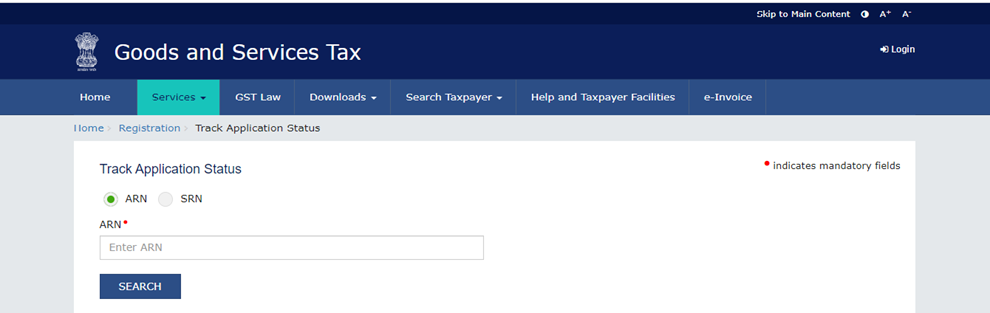
Through ARN:
- Access the official GST portal by visiting www.gst.gov.in.
- Provide your valid login credentials on the login page.
- Navigate your cursor to the “Service” section, then choose “Returns,” and select “Track Return Status.”
- In the designated ARN field, enter your ARN number.
- Click the “Search” button to proceed.
-
GST Suvidha Providers (GSPs):
-
GST Helpdesk:
The Bottom Line
In the world of GST compliance, staying informed about your return status is your compass to smoother financial waters. Learn how to effortlessly navigate the sea of GST return filings with our guide on checking GST return status.Frequently Asked Question
-
How many GST returns per month?
-
What is the GST return status, and how can you check it?
- Visit the common portal at https://www.gst.gov.in/
- Enter your valid login credentials on the login page.
- Click on the “Service” tab, then select “Returns,” and find the “View e-Files.”
-
Can you check the GST return status of another person?
- Open the common portal at https://www.gst.gov.in/
- Click on the “Search taxpayer” tab, then select “Search by GSTIN/UIN.”
- Enter the GSTIN of the other person.
- Complete the characters/Captcha verification.
- Click the “Search” button. You will then see the GSTIN validity status and the option to view filed returns.
-
How can you determine if a vendor has filed their GST returns?
- Log in to the common portal at https://www.gst.gov.in/
- Select the GSTR dashboard.
- Choose the return period for which you want to check the invoices.
- Click on the GSTR-2A return form to review the data filed by your vendors.
How do I check my GST return filed status?
To verify the status of your filed GST returns, you can follow these steps:-
Visit the common portal at https://www.gst.gov.in/.
-
Enter your valid login credentials in the designated login area.
-
Navigate to the “Service” tab, then select “Returns.”
-
Find and click on the “View e-Files Return” option.
-
From the drop-down menu, select the Financial Year, Return Filing Period, and Return Type.
-
Click the “Search” button to check and view the GST Return Status for all the returns you have filed.
